量化自己

量化自己
陈鑫宇偶然读到了一篇文章《用NLP模型过滤缠扰言论》
大模型原来还可以被自我训练,量化出一个自己。看起来貌似也不是很难 。
那就做吧!
去年做blender渲染,找了一下能用的,便宜的云显卡。今年刚好能用上。
1 | (py310) root@10-23-218-65:~# lscpu | grep -E 'Model name|^CPU\(s\)|Core\(s\) per socket|Socket\(s\)' |
哎呀!怎么都涨价了?已经翻三倍了
草草用用吧。
1. 服务器基线确认
1.1 前置条件
已从算力平台获得:IP、SSH端口、root密码、已选镜像(PyTorch 2.1.2 / Python 3.10 / CUDA 12.1)。
1.2 登录与系统确认
1 | # 从本地 Mac 连接;-p 23 为平台分配的 SSH 端口,非默认 22 |
可验证结果:
1 | The authenticity of host '[106.75.240.167]:23 ([106.75.240.167]:23)' can't be established. |
提示符(py310)说明conda已自动激活预置环境py310,路径在/usr/local/miniconda3/envs/py310。这一步决定了后续第2节的坑。
1.3 GPU与驱动确认
1 | nvidia-smi # 预期:驱动版本 + CUDA Version + 23.5GB 显存 + 0 占用 |
可验证结果:nvidia-smi输出中Memory-Usage初始接近0 MiB;训练开始后应稳定在 16~21 GB区间,Volatile GPU-Util维持90~100%。低于50%说明数据加载或 batch配置存在瓶颈。
1.4 磁盘确认
1 | df -h # 系统盘通常 30~50GB,模型与产物必须放数据盘 |
7B模型会产出三份大文件:基座缓存(~15GB)+ 合并模型(~15GB)+ GGUF(4~8GB)。系统盘放不下时必须切数据盘(AutoDL为/root/autodl-tmp)。
2. 安装LLaMA-Factory
2.1 操作目的
获得训练 / 合并导出 / 格式转换的统一入口llamafactory-cli。
1 | git clone https://github.com/hiyouga/LLaMA-Factory.git |
2.2 报错 1:Python版本不满足
触发命令:pip install -e .[metrics](在默认py310环境中)
错误原文:
1 | INFO: pip is looking at multiple versions of llamafactory to determine which version is compatible with |
排查定位:报错直指llamafactory==0.9.6.dev0的元数据约束。从同一段日志可看到该版本的依赖收敛范围:
1 | Collecting transformers!=4.57.0,!=5.6.0,<=5.8.0,>=4.55.0 (from llamafactory==0.9.6.dev0) |
即:0.9.6.dev0强制Python ≥ 3.11,与镜像预置的3.10.16冲突。选型阶段推荐的「Python 3.10依赖冲突最少」在此版本上已失效。
解决过程:新建conda环境后重装。
1 | conda create -n py311 python=3.11 -y |
可验证结果:
1 | python -V # Python 3.11.x |
实测装到的关键版本:torch 2.14.1、transformers 5.8.0、peft 0.18.1、trl 0.24.0、accelerate 1.11.0、gradio 5.50.0、modelscope 1.40.2。
版本号核验(重要):日志中的llamafactory==0.9.6.dev0不是发布版本。核验结果:
1 | gh api repos/hiyouga/LLaMA-Factory/tags --jq '.[].name' | head -5 # v0.9.5 v0.9.4 v0.9.3 ... |
PyPI与GitHub tag最新均为 v0.9.5,不存在0.9.6。0.9.6.dev0是pip install -e .从master源码安装时,setuptools_scm基于最新tag自动推断出的开发态版本号(即v0.9.5之后的未发布快照)。
影响:凡本文引用src/llamafactory/...源码作为依据处,均指master分支当前代码,与v0.9.5正式版可能存在差异;与0.9.6.dev0快照的差异未做逐commit比对。
结论:镜像选择应直接选Python 3.11,可省掉这一轮重建。CUDA版本仍选12.1(预编译wheel的最大公约数,避免云端源码编译)。
3. 数据集构造与注册
3.1 前置条件
语料为微信聊天记录,由WeFlow导出为JSON,字段含type(消息类型)、content(文本)、createTime(秒级时间戳)、isSend(0=对方 / 1=我)。
3.2 操作目的
把「一问一答」升级为「多轮对话」,保留真实的上下文抛接结构。
关键参数(脚本内):
- 静默阈值 30分钟:双方无消息超过该值即切分新的Session;
- 阵营合并:Session内同一人的连续消息合并为单条,直到对方插话;
- 入库约束:首条必须
human、末条必须gpt、至少2轮。
可验证结果:脚本输出重构完成!共提炼出1729个高质量多轮对话局,已保存至 sharegpt_train_data.json。
3.3 注册数据集
编辑data/dataset_info.json,把配置插在最外层{下面(不是追加到文件末尾):
1 | "personal_style_sharegpt": { |
3.4 验证方式
WebUI Train页点击 预览数据集,弹窗第一条应是完整的多轮微信对话;命令行侧以训练日志Num examples = 1,729为准。
3.5 报错 2:样本被丢弃
触发命令:首次训练启动
错误原文:
1 | [WARNING|2026-10-11 13:19:54] llamafactory.data.processor.supervised:149 >> Dropped invalid example: [] |
排查定位:日志中Dropped invalid example:后的列表为空[],说明被丢弃的样本内容为空——即数据集注册格式与文件格式不匹配(alpaca格式配置去读 sharegpt文件,或反之),解析出的对话列表为空。该WARNING不中断训练,但会静默减少有效样本量。
解决过程:核对dataset_info.json的formatting与tags是否与JSON文件实际字段一致。修正后重跑,日志显示Num examples = 1,729(无 dropped)。
结论:
Dropped invalid example必须用Num examples交叉验证,不能只看「训练跑起来了」。
4. 训练
4.1 参数选择依据
先量化数据长度分布,再定cutoff_len
1 | import json |
实测输出:1729条 / 平均265.7字符 / 最大5313字符 / 超500字符的242条。
4.2 报错 3/4/5:三次CUDA OOM
触发配置与结果:
| # | cutoff_len | batch size | grad_accum | gradient_checkpointing | 结果 |
|---|---|---|---|---|---|
| 1 | 2048 | 4 | 8 | 否 | Step 1即OOM |
| 2 | 2048 | 2 | 16 | 否 | Step 9 OOM |
| 3 | 2048 | 2 | 16 | 是 | Step 9仍OOM |
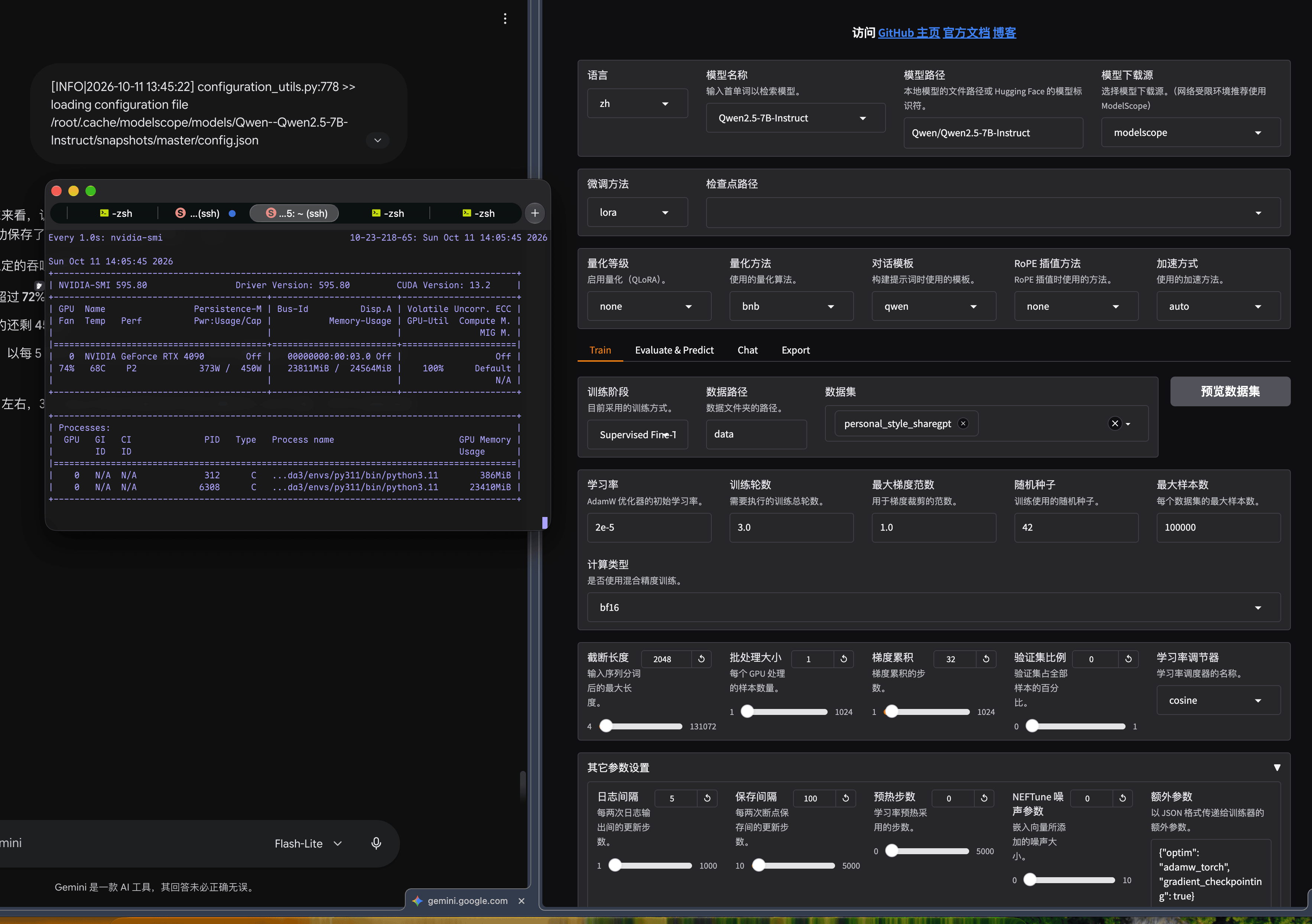
| 4 | 1024 | 1 | 32 | 是 | ✅ 跑完3 Epoch / 165步 |
错误原文(第 1 次):
1 | torch.OutOfMemoryError: CUDA out of memory. Tried to allocate 2.38 GiB. GPU 0 has a total capacity of |
第 2、3 次报错同构,仅数字变化:Tried to allocate 2.32 GiB ... of which 2.08 GiB is free ... this process has 21.04 GiB memory in use。
排查定位:
- 崩溃点固定在
transformers/loss/loss_utils.py:37 fixed_cross_entropy→torch._C._nn.cross_entropy_loss,即反向传播起点,不是前向;
-18.82 GiB is allocated by PyTorch说明基座权重 + 激活值已吃满,剩余2.20 GiB不够分配logits的梯度(batch×seq×152064词表); - 关键:第3次已开
gradient_checkpointing仍崩 → 说明单样本峰值由最长序列决定,而数据中存在5,313字符的样本。cutoff_len 2048下该样本的 logits 张量本身就是显存炸弹。
解决过程:把cutoff_len从2048降到1024、batch降到1、梯度累积升到32保持等效batch size不变。
1 | export PYTORCH_CUDA_ALLOC_CONF=expandable_segments:True # 可选:缓解碎片,非必需 |
4.3 报错 6:输出目录已存在
触发命令:第二次启动训练(沿用相同--output_dir)
错误原文:
1 | ValueError: Output directory already exists and is not empty. Please set`overwrite_output_dir`. |
排查定位:安全拦截——目录下已有上一次的checkpoint。
解决过程:二选一。
1 | # 方案 A:显式允许覆盖(会清掉旧 checkpoint) |
4.4 最终可用命令
1 | llamafactory-cli train \ |
可验证结果:
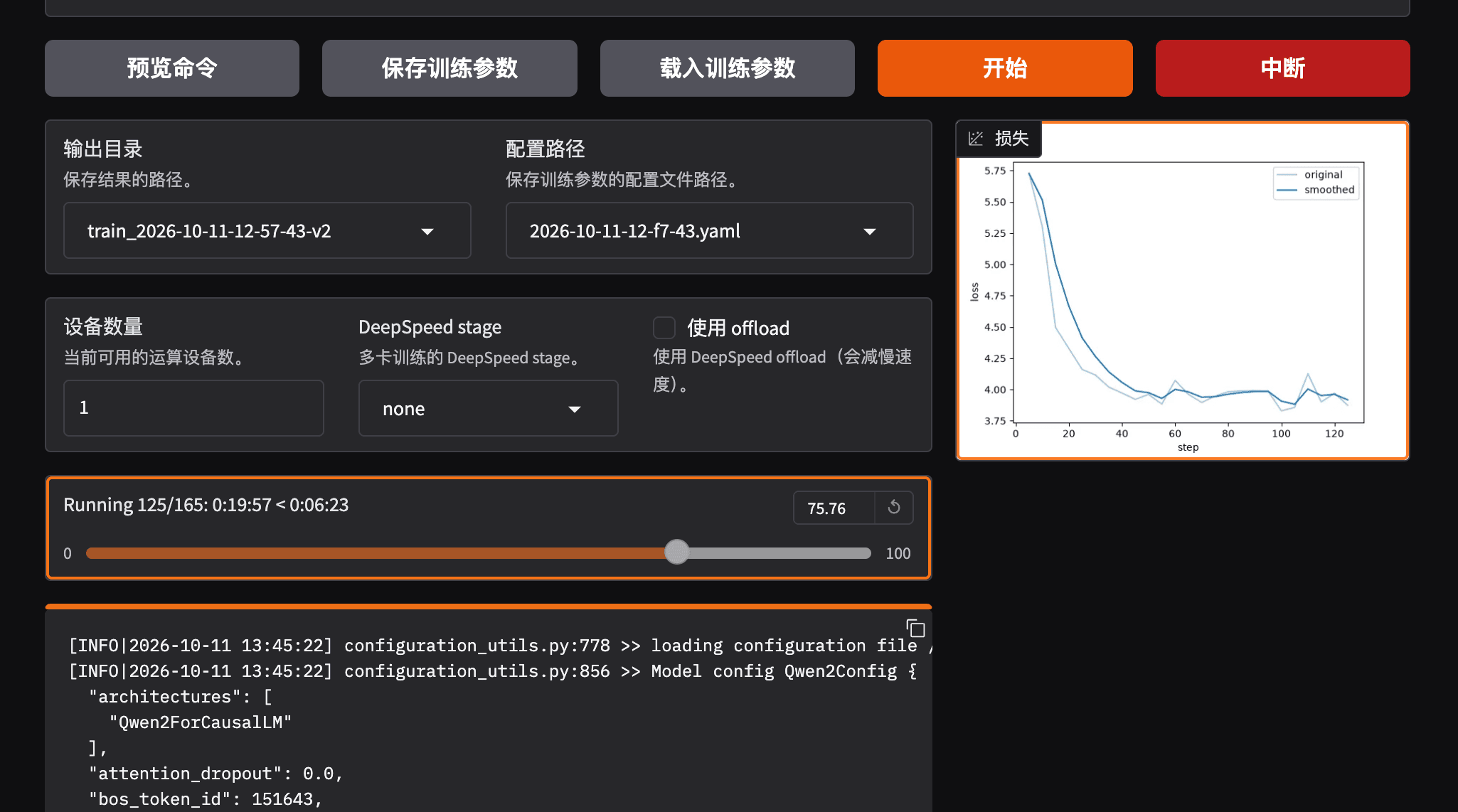
1 | Num examples = 1,729 | Num Epochs = 3 | Num update steps per epoch = 55 |
Loss轨迹:5.7270 → 4.0200(约40步)→ 3.8~4.0 横盘 → 4.3965(第165步末端反弹),train_loss 4.4711。
末端反弹原因:lr_scheduler_type cosine把学习率压到1.8125e-09,优化器失去修正能力,同时shuffle末尾撞上风格突变样本。该解释基于日志推断,非官方结论,标注为待验证。
5. 合并导出(LoRA → 完整HF模型)
5.1 前置条件
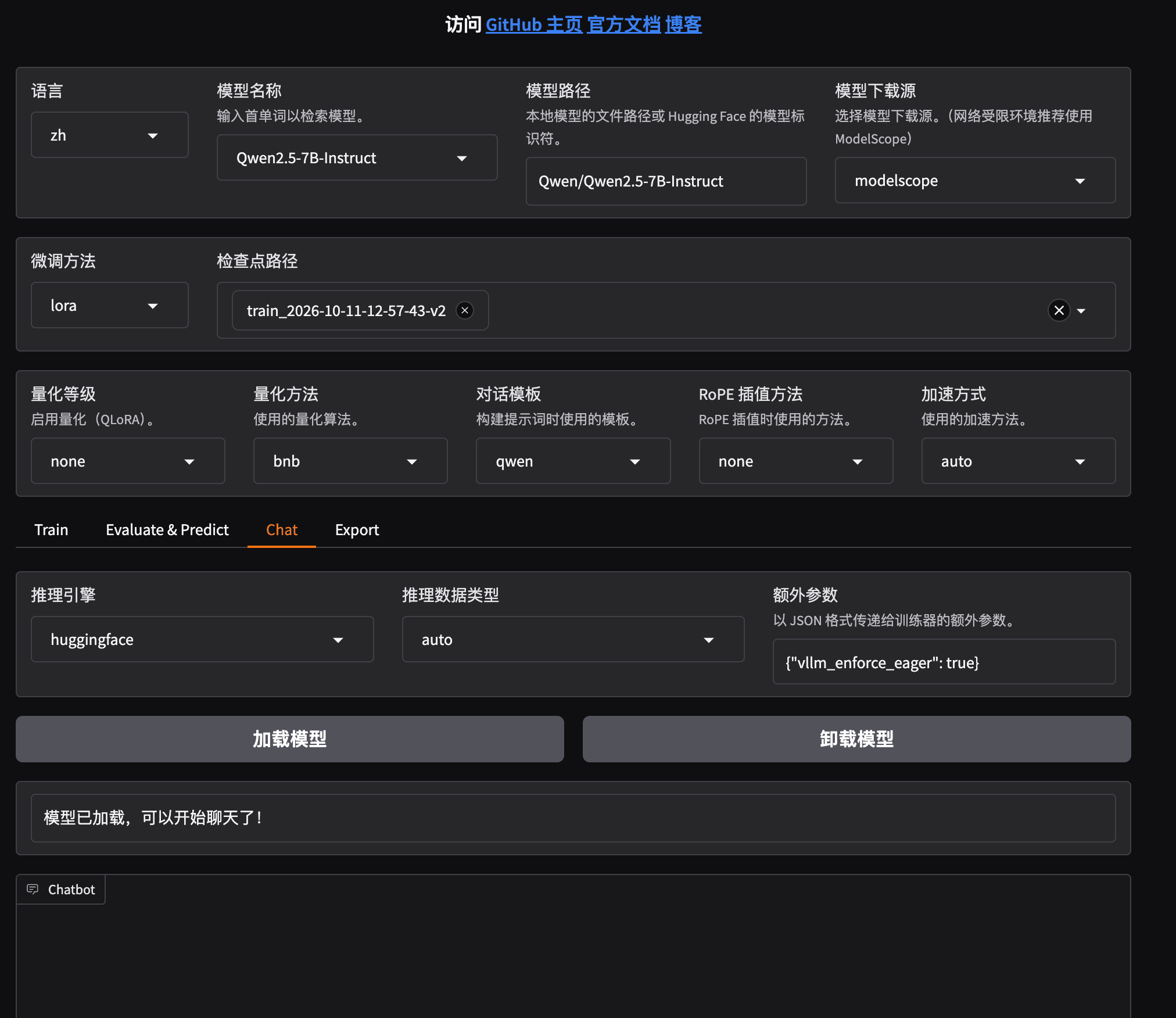
第4节训练完成,产出saves/Qwen2.5-7B-Instruct/lora/train_2026-10-11-12-57-43-v2。
5.2 操作目的
把LoRA低秩矩阵吸收进基座权重,产出独立的、不依赖adapter的标准HF目录——这是量化的必需前置,量化工具不接受分离的adapter。
1 | llamafactory-cli export \ |
参数依据(src/llamafactory/hparams/model_args.py):
1 | export_size: int = field(default=5, metadata={"help": "The file shard size (in GB) of the exported model."}) |
⚠️ 版本差异:main分支的
export_device只接受cpu/auto,而本文实测在0.9.6.dev0上传cuda被正常接受并完成导出。以实际版本的llamafactory-cli export --help为准。
5.3 可验证结果
1 | Loading checkpoint shards: 100%|██████████| 4/4 [00:00<00:00, 91.87it/s] |
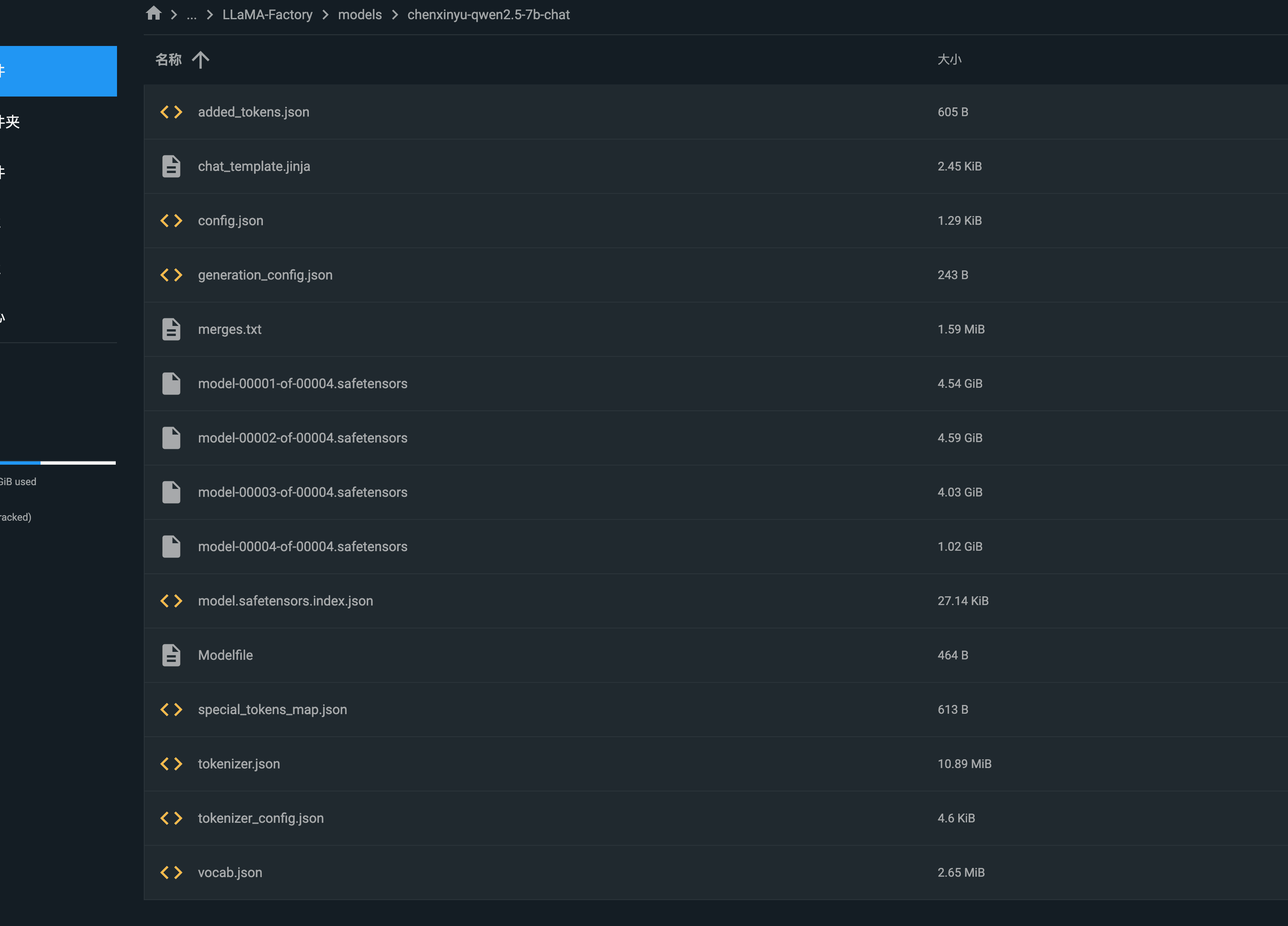
目录内容:
1 | ls LLaMA-Factory/models/chenxinyu-qwen2.5-7b-chat |
注意:导出目录缺少tokenizer.model(Qwen2.5使用tokenizer.json现代词表,非SentencePiece.model)。这直接导致第6节的报错9。
6. 量化:四条路径的实测结果
路径结论汇总(先看结果)
| 路径 | 做法 | 结果 | 判定 |
|---|---|---|---|
| A | LLaMA-Factory Export页选量化等级 | 下拉框置灰,未产出 | ❌ 该选项是 GPTQ位数量化(2/3/4/8),不是GGUF;置灰原因是多选了checkpoint |
| B | convert_hf_to_gguf.py --outtype q4_k_m |
三个报错连环,未产出 | ❌--outtype根本不支持K-quant |
| C | 独立 venv +convert_hf_to_gguf.py --outtype f16→llama-quantize Q4_K_M |
未在本文环境跑完 | ✅ 唯一可行,官方two-phase流程 |
| D | ollama create -f Modelfile导入 safetensors |
可运行 | ⚠️ 可用于验证推理效果,但Ollama导入时不量化 |
唯一可达成目标的路径是C。 B的失败见6.2,C的完整做法见6.3,D的定位见6.4。
6.1 路径A:LLaMA-Factory直接导出GGUF —— 失败
操作:Export页面选择「导出量化等级」,或命令行--export_quantization_bit。
现象:WebUI中「导出量化等级」下拉框置灰不可选;命令行方式同样未产出GGUF。
源码级排查(克隆hiyouga/LLaMA-Factorymain分支,src/llamafactory/webui/components/export.py):
1 | GPTQ_BITS = ["8", "4", "3", "2"] # 第 37 行 |
置灰根因(已定位,非"环境缺组件"):当checkpoint_path是非空 list(即在检查点选择框里选了多个checkpoint目录)时,can_quantize()直接返回interactive=False。与llama.cpp组件、GGUF依赖无关。
该选项的真实语义(已定位,不是GGUF):
1 | # src/llamafactory/model/model_utils/quantization.py:143 |
结论:
- 「导出量化等级」= GPTQ位数量化(2/3/4/8 bit),依赖
optimum+gptqmodel,产出的是 GPTQ量化的safetensors模型,与GGUF的q4_k_m是两条完全不同的技术路线; - 置灰触发条件是多选了checkpoint,不是环境缺组件;
- GPTQ路线还要求必填校准数据集(
__post_init__中export_quantization_dataset is None直接raise ValueError),且GPTQ + LoRA adapter组合被WebUI显式禁止(err_gptq_lora); - LLaMA-Factory README(main)全文无
GGUF/llama.cpp/--export_quantization关键词,GGUF导出无官方文档依据。
判定:LLaMA-Factory 无法产出q4_k_m GGUF,不作为量化路径。
6.2 路径B:llama.cpp脚本一步转q4_k_m —— 失败(三次不同报错)
报错 7:脚本不存在
触发命令:
1 | python llama.cpp/convert_hf_to_gguf.py models/chenxinyu-qwen2.5-7b-chat --outfile models/chenxinyu-q4_k_m.gguf --outtype q4_k_m |
错误原文:
1 | python: can't open file '/root/llama.cpp/convert_hf_to_gguf.py': [Errno 2] No such file or directory |
排查定位:llama.cpp目录根本不存在——此前只执行了pip install -r llama.cpp/requirements.txt,从未git clone仓库。
解决过程:
1 | cd ~ |
致命副作用(本次实操最大的坑):
pip install -r requirements.txt会卸载GPU版PyTorch并替换为CPU版,同时降级transformers。详见报错10。
报错 8:脚本文件名混淆
错误原文:
1 | python: can't open file '/root/llama.cpp/convert-hf-to-gguf.py': [Errno 2] No such file or directory |
排查定位:尝试用横线版文件名convert-hf-to-gguf.py,实际文件是下划线版。中间一度被建议改用横线名,属于误判——ls确认实际文件名后应以ls结果为准。
1 | ls ~/llama.cpp/convert*.py # 以实际输出为准,不要凭记忆写文件名 |
报错 9:词表写入失败(本次最核心的失败)
触发命令:
1 | python llama.cpp/convert_hf_to_gguf.py LLaMA-Factory/models/chenxinyu-qwen2.5-7b-chat \ |
现象:权重转换阶段完全正常,逐层输出:
1 | INFO:hf-to-gguf:token_embd.weight, torch.bfloat16 --> F16, shape = {3584, 152064} |
错误原文(完整因果链,三层异常):
1 | Traceback (most recent call last): |
排查定位(三层因果):
- 第一层:
qwen.py:63先尝试SentencePiece路径_set_vocab_sentencepiece(),去找tokenizer.model;Qwen2.5导出目录只有tokenizer.json,故FileNotFoundError。 - 第二层:代码捕获该异常后 fallback到
_set_vocab_gpt2()(qwen.py:65),其内部执行from transformers import AutoTokenizer(base.py:1756)。 - 第三层:此时transformers 4.57.6加载链
generation/utils.py→torch._dynamo→torch._inductor→import triton.backends.compiler失败,抛出No module named 'triton.backends',最终包装成Could not import module 'AutoTokenizer'。
根因不是「缺AutoTokenizer」,而是torch与triton版本不匹配。
报错 10:环境被 requirements.txt污染
触发命令:pip install -r llama.cpp/requirements.txt(在训练环境py310中)
错误原文:
1 | Uninstalling aiohttp-3.14.5: Successfully uninstalled aiohttp-3.14.5 |
排查定位:llama.cpp的转换依赖声明了torch==2.11.0(CPU版)与transformers==4.57.6,pip为满足约束卸载了GPU版torch,装上CPU版。后果:训练/推理GPU不可用,且triton 2.1.0与新torch不匹配,直接触发报错9。
解决过程(恢复 GPU 环境):
1 | pip uninstall -y torch torchvision torchaudio |
结论(本文最重要的一条):绝不在训练环境里pip install -r llama.cpp/requirements.txt。 GGUF转换必须在独立venv中进行。
6.3 路径C:独立venv + 官方两步法(唯一可行路径)
依据:llama.cpptools/quantize/README.md原文 —— 「Quantization is done in two phases: Convert the original model to GGUF format. Quantize the converted GGUF file.」
关键事实(源码级核验,convert_hf_to_gguf.pyargparse定义):
1 | "--outtype", type=str, |
--outtype不接受任何K-quant类型(无 q2_k / q3_k / q4_k_m / q5_k_m / q6_k)。K-quant必须交给llama-quantize。
对原流程的修正:原对话中建议的
python convert_hf_to_gguf.py ... --outtype q4_k_m会被argparse直接以invalid choice拒绝,不可能产出q4_k_m。该建议错误。
第一步:HF → F16 GGUF(在独立venv中执行)
1 | # 1) 建独立环境——llama.cpp 的 requirements 会装 CPU 版 torch,绝不能进训练 env |
可验证结果:日志末行Model successfully exported to ...;此前会输出INFO:hf-to-gguf:gguf: context length = 32768。第6.2节的报错9就发生在Set model tokenizer之后、write()完成之前——即在venv中仍需保证transformers能正常import(见报错10)。
第二步:F16 → Q4_K_M(llama-quantize二进制)
官方命令形态(tools/quantize/README.md原文示例):
1 | # 二进制路径为 cmake 编译产物;也可下载 release 预编译包 |
对应到本文路径:
1 | cd ~/llama.cpp |
常用选项(官方清单):
1 | --imatrix imatrix.gguf # 重要性矩阵,官方称可降低 ppl/KLD 损失 |
可验证结果:
1 | ls -lh ~/models/*.gguf |
体积依据(官方tools/quantize/README.md,Llama-3.1-8B实测表):
| 类型 | bits/weight | 体积 (GiB) |
|---|---|---|
| F16 | 16.0005 | 14.96 |
| Q8_0 | 8.5008 | 7.95 |
| Q6_K | 6.5633 | 6.14 |
| Q5_K_M | 5.7036 | 5.33 |
| Q4_K_M | 4.8944 | 4.58 |
| Q4_K_S | 4.6672 | 4.36 |
7B Qwen2.5词表152064(大于Llama-3的128256),embedding层更大,Q4_K_M实际体积预计略高于4.58 GiB,约4.7~5.0 GiB。该数字为外推估算,待实测验证。
6.4 路径D:Ollama直接导入 —— 可作为部署手段,但不能产出量化模型
官方依据(ollama/ollama``docs/import.mdx)明确支持两种导入:
1 | # 方式一:Safetensors 目录 |
同一文档中的决定性一句:
"Ollama does not quantize GGUF models during import. Prepare and quantize them first with a GGUF tool such as llama.cpp's
llama-quantize."
结论:Ollama在ollama create阶段不做任何量化。导入safetensors目录只会得到bf16精度的可运行模型,不满足本文「量化模型版本」的目标。
因此路径D的正确定位:验证合并模型推理效果的快速手段,而非量化路径。
1 | # 在含 Modelfile 的目录下(Modelfile 由 LLaMA-Factory 导出时自动生成) |
若要得到量化版 Ollama 模型,必须先在6.3产出GGUF,再改写 Modelfile:
1 | FROM /path/to/chenxinyu-Q4_K_M.gguf |
7. 量化产物的验证方法
| 验证维度 | 方法 | 判定标准 |
|---|---|---|
| 文件完整性 | ls -lh体积落在预期区间 |
官方Llama-3.1-8B基准:F16 14.96 / Q8_0 7.95 / Q5_K_M 5.33 / Q4_K_M 4.58 / Q4_K_S 4.36 GiB。Qwen2.5-7B词表152064 >Llama-3的128256,预计Q4_K_M ≈ 4.7~5.0 GiB(外推估算,待实测) |
| 元数据正确 | GGUFReader读general.architecture/general.file_type |
应为qwen2/ 对应 quant 类型枚举值 |
| 上下文长度 | 元数据context_length |
应为32768,与转换日志gguf: context length = 32768一致 |
| 可加载 | ./build/bin/llama-cli -m <gguf> -p "..."或ollama run |
无报错即通过 |
| 语义一致性 | 同一prompt分别喂bf16原模型与Q4_K_M,对比输出 | 主题与结论一致,允许措辞差异 |
| 风格保真 | 用训练语料中的典型问法测试 | 口癖、标点习惯是否保留(本次未通过,见下) |
| 精度损失量化 | llama.cpp官方提供ppl / KLD度量,--imatrix可降低损失 |
本文未执行 |
本次的最终状态:第4、5节成功;第6节量化未产出成品GGUF,即目标产物未达成。已完成的验证止于「合并模型可加载推理」。
未通过项(如实记录):合并模型实际对话时「说话不像本人」。已定位的四类嫌疑(按可能性排序):
- 清洗阶段误删口癖/标点习惯等风格指纹;
2.lora_rank 8对强风格拟合偏保守; - 推理
temperature 0.7偏低、max_new_tokens 512过长,把语气拉回「助手腔」; - 1,729条数据中长对话被
cutoff_len 1024切尾。
8. 核验依据清单(8.1已核验 / 8.2待验证)
8.1 已核验(含依据来源)
| # | 内容 | 结论 | 依据 |
|---|---|---|---|
| 1 | --outtype是否支持q4_k_m |
不支持。合法值仅f32/f16/bf16/q8_0/tq1_0/tq2_0/auto |
ggml-org/llama.cppmasterconvert_hf_to_gguf.pyargparse源码 |
| 2 | 量化是否必须两步 | 是。官方明写two phases:先转 GGUF,再llama-quantize |
llama.cpp/tools/quantize/README.md |
| 3 | llama-quantize命令签名 |
./build/bin/llama-quantize <in.gguf> <out.gguf> Q4_K_M [nthread];二进制为cmake编译产物 |
同上 |
| 4 | requirements 的 transformers 版本 | 默认装transformers 4,官方称可安全pip install -U transformers升到5 |
同上 |
| 5 | 体积参考 | Llama-3.1-8B:F16 14.96 / Q8_0 7.95 / Q5_K_M 5.33 / Q4_K_M 4.58 GiB | 同上(官方实测表) |
| 6 | LLaMA-Factory「导出量化等级」的真实语义 | GPTQ位数量化,选项仅none/8/4/3/2(GPTQ_BITS = ["8","4","3","2"]),依赖optimum>=1.24.0+gptqmodel>=2.0.0,产出GPTQ safetensors,不是GGUF |
webui/components/export.py:37,121+model/model_utils/quantization.py:143 |
| 7 | 下拉框置灰的确切条件 | can_quantize()中checkpoint_path为非空 list(多选checkpoint)时返回interactive=False。与llama.cpp组件无关 |
webui/components/export.py:40-44 |
| 8 | 0.9.6.dev0是否为发布版 |
不是。PyPI latest = 0.9.5,GitHub 最新 tag = v0.9.5;0.9.6.dev0是pip install -e .时setuptools_scm推断的开发态快照号 |
gh api repos/hiyouga/LLaMA-Factory/tags+pypi.org/pypi/llamafactory |
| 9 | Ollama导入时是否量化 | 不量化。官方原句见6.4节 | ollama/ollama``docs/import.mdx |
| 10 | Ollama支持的导入格式 | safetensors目录 / 单文件 GGUF / 分片GGUF(model-*.gguf)三种 |
同上 |
8.2 待验证
| # | 内容 | 备注 |
|---|---|---|
| 1 | Qwen2.5-7B(词表152064)Q4_K_M的实际体积 | 外推4.7~5.0 GiB,需实测 |
| 2 | Qwen2转换时tokenizer.model缺失的官方推荐解法 |
本文以「保证transformers可正常import」绕过,未查官方说明 |
| 3 | 0.9.6.dev0快照与 master 分支的逐 commit 差异 |
本文源码依据均取自master,未与当时快照比对 |
| 4 | 合并前后参数量差20,185,088的口径解释 | 待核验 |
| 5 | Loss末端反弹的成因解释 | 推断,待验证 |
| 6 | Q4_K_M相对bf16的风格保真损失量化(ppl / KLD) | 官方提供--imatrix与ppl度量方法,本文未执行 |
9. 报错总表与关键认知修正
| # | 阶段 | 触发命令 | 错误原文(摘) | 根因 | 解决 |
|---|---|---|---|---|---|
| 1 | 安装 | pip install -e .[metrics] |
Package 'llamafactory' requires a different Python: 3.10.16 not in '>=3.11.0' |
0.9.6.dev0要求Python ≥3.11 | conda create -n py311后重装 |
| 2 | 数据 | 训练启动 | Dropped invalid example: [] |
数据集格式配置与文件不匹配 | 核对formatting/tags,用Num examples复验 |
| 3 | 训练 | cutoff 2048 / bs 4 | CUDA out of memory. Tried to allocate 2.38 GiB ... 20.92 GiB memory in use |
反向传播logits梯度峰值 | 降 cutoff / batch |
| 4 | 训练 | cutoff 2048 / bs 2 | Tried to allocate 2.32 GiB ... 21.04 GiB memory in use |
同上,最长样本触发 | 同上 |
| 5 | 训练 | cutoff 2048 / bs 2 + gc | 同 #4 | 单样本峰值不受gc影响 | cutoff降到1024 |
| 6 | 训练 | 二次启动同目录 | Output directory already exists and is not empty |
安全拦截 | --overwrite_output_dir True或换目录 |
| 7 | 量化 | convert_hf_to_gguf.py |
can't open file '/root/llama.cpp/convert_hf_to_gguf.py' |
未clone仓库 | git clone ggml-org/llama.cpp |
| 8 | 量化 | 横线文件名 | can't open file '.../convert-hf-to-gguf.py' |
文件名记错 | 以ls结果为准 |
| 9 | 量化 | 转换写词表 | FileNotFoundError: ... tokenizer.model→No module named 'triton.backends'→Could not import module 'AutoTokenizer' |
torch/triton/transformers版本链断裂 | 恢复GPU torch与匹配triton |
| 10 | 量化 | pip install -r requirements.txt |
torchvision 0.29.1 requires torch>=2.14.0, but you have torch 2.11.0+cpu |
requirements用CPU torch覆盖GPU torch | 独立venv;或重装cu121 torch |
| 11 | 导出 | Export 页选量化等级 | 下拉框置灰,不可选 | 多选了checkpoint(can_quantize()对非空 list 返回interactive=False);且该选项本身是GPTQ位数量化,非GGUF |
走路径C |
| 12 | 认知 | --outtype q4_k_m |
argparseinvalid choice: 'q4_k_m'(未被触发,因该命令从未执行成功) |
把GGUF K-quant与convert的dtype转换混为一谈 | 改两步法:--outtype f16+llama-quantize Q4_K_M |
| 13 | 认知 | 认为ollama create会量化 |
无报错,但产物仍为bf16 | Ollama官方明写导入时不量化 | 先用llama-quantize产出GGUF,再改写 Modelfile |
| 14 | 认知 | 认为「导出量化等级」= GGUF量化 | 无报错 | 该选项实为GPTQ(none/8/4/3/2) |
明确区分GPTQ与GGUF两条路线 |
附:本文相对原流程的三处硬修正(均有源码/官方文档依据)
1.--outtype q4_k_m不可行——convert_hf_to_gguf.py的合法值仅f32/f16/bf16/q8_0/tq1_0/tq2_0/auto。
2. LLaMA-Factory的「导出量化等级」不是GGUF——它是GPTQ位数量化,选项只有none/8/4/3/2。
3.ollama create不量化——官方原句:"Ollama does not quantize GGUF models during import."